
The visual content landscape in 2026 has become intensely competitive. Brands are expected to produce polished, channel-ready graphics at a pace that would have required an entire design department just a few years ago. Social media managers need vertical and square assets ready before campaigns go live. Ecommerce teams are expected to generate consistent product visuals across dozens of SKUs without burning through a photography budget. Educators need multilingual diagrams that read cleanly in two or three languages at once.
The problem is that most AI image generators were built for creative exploration, not structured production. They handle atmospheric scenes and artistic concepts reasonably well, but the moment you need text to be legible, labels to render correctly in Chinese or Japanese, or five outputs to look like they belong to the same brand — the results fall apart. That gap has been a persistent frustration for professionals who need AI image generation to work reliably, not just impressively.
Nano Banana Pro, available through SuperMaker AI, is designed to address exactly that gap. This article breaks down what it does differently, who it serves best, and how to use it effectively from day one.
The Real Pain Points That Slow Down Visual Production
Before evaluating any tool, it helps to be specific about the problems professionals actually encounter. These aren’t hypothetical edge cases — they are the daily friction points that inflate production time and force manual correction workflows:
- Unreadable text inside generated images. Ask a standard AI generator to produce a poster with a headline or a chart with labels, and the output typically contains warped, misspelled, or nonsensical characters. The image looks right at a glance but fails the moment anyone reads it.
- Broken multilingual rendering. Generating graphics with Chinese, Japanese, Korean, or Arabic labels is a consistent failure point across most general-purpose tools. Characters come out corrupted or substituted, making the output unusable for localized markets without complete manual rework.
- Style inconsistency across a set of images. Generate five product images in sequence and each one tends to drift — slightly different lighting, color temperature, and compositional framing. Maintaining visual consistency across a brand asset library requires constant intervention.
- Format inflexibility. Many tools lock you into a default square output. Getting the right aspect ratio for a YouTube thumbnail, an Instagram story, a Facebook banner, and a pitch deck slide from the same prompt means regenerating or cropping — both of which compromise the original composition.
- Single reference input limits. Describing what you want in text works for simple concepts. For structured brand work, you need to show the tool a style guide, a subject reference, and a layout example simultaneously. Most tools don’t support this.
These friction points accumulate. A workflow that looks efficient on paper becomes far more labor-intensive when every output needs text corrections, brand alignment adjustments, and format resizing before it can actually be used.
What Nano Banana Pro Does Differently
Nano Banana Pro is the advanced image generation model within SuperMaker AI’s creative platform. The platform covers video generation, music creation, and voice synthesis, but Nano Banana Pro sits specifically within the AI Image Maker and is accessible directly from any browser — no account creation and no software installation required.
Accurate Text Rendering with Multilingual Support
The most technically significant capability is precise text rendering within generated images — headlines on posters, annotations on diagrams, labels on charts, and body copy on infographic layouts. Crucially, the model includes enhanced support for Asian language scripts, with Chinese, Japanese, and Korean characters rendering legibly rather than collapsing into corrupted glyphs. For any team producing localized marketing assets or educational materials across language markets, this removes the most labor-intensive post-processing step in AI-assisted design.
Multi-Image Prompts — Up to Four Reference Inputs
Nano Banana Pro supports up to four input images simultaneously within a single prompt. You can provide a color palette reference, a composition example, a subject identity anchor, and a style guide all at once. The model synthesizes them into a coherent output rather than averaging them into something generic. For brand teams, this means maintaining visual consistency across large campaign asset sets without manual retouching between each generation.
2K Native Output with 4K Upscale Pipeline
Output resolution is 2K natively, with a 4K upscale option available for high-DPI displays, print-ready work, and ecommerce product pages. The tool supports a comprehensive set of aspect ratios — 16:9, 1:1, 4:3, 3:2, 2:3, 3:4, 4:5, 9:16, and 21:9 — covering virtually every digital channel format without requiring post-generation cropping.
How to Use Nano Banana Pro in Four Simple Steps
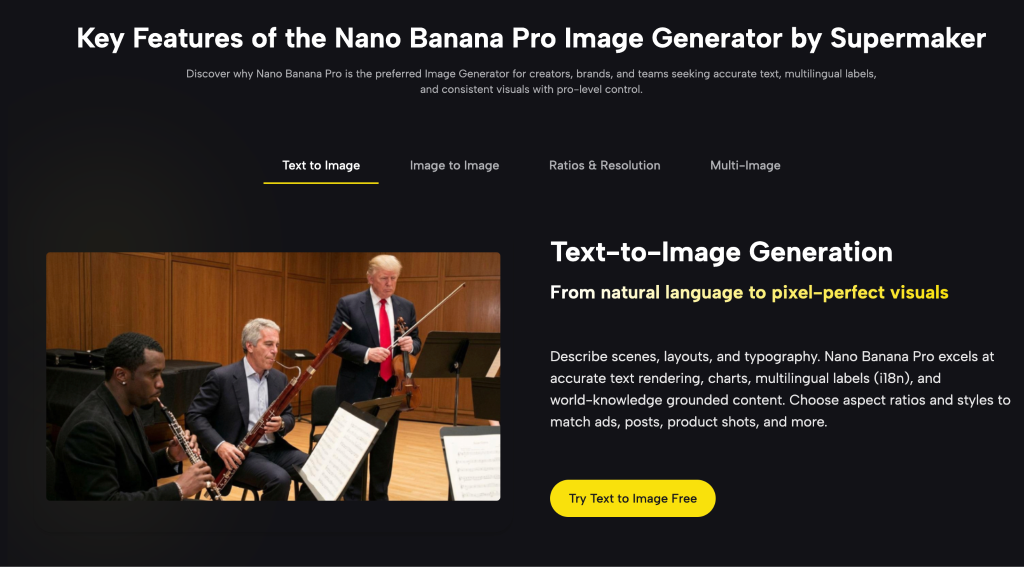
The generation flow mirrors exactly how the tool is laid out on the platform — four clear stages with no learning curve required.
Step 1 — Start from Text or Image Type a prompt describing your scene, layout, and any text elements. Or upload one to four reference images to guide style, subject identity, and composition. You can switch between text-to-image and image-to-image in one place.
Step 2 — Choose Style and Aspect Ratio Pick your preferred style, color mood, and aspect ratio. Select from landscape, square, and portrait formats so every image fits the channel it’s destined for — social, web, print, or presentation.
Step 3 — Edit, Annotate, Refine Use image-to-image mode to adjust composition, replace objects, and refine diagrams or labels. Strong text rendering and multilingual support make infographics and UI elements look right without manual correction.
Step 4 — Generate, Review, Download Generate up to four high-fidelity variations (2K native, 4K upscale pipeline), compare them side by side, then export instantly — no sign-up needed.
Who Benefits Most from Nano Banana Pro
The tool fits a specific set of professional workflows particularly well:
- Marketing and brand teams running localized campaigns across multiple regions, where text accuracy and format consistency are requirements, not preferences.
- Educators and training professionals producing bilingual instructional diagrams, multilingual slide visuals, and annotated learning materials.
- Ecommerce and product design teams generating consistent SKU imagery, background-swapped product shots, and material mockups at production volume.
- Social media managers and content creators who need to move from brief to publishable asset quickly across multiple platform formats.
- Founders and consultants building pitch decks that require clean data visualizations and on-brand imagery across every slide.
Nano Banana Pro vs. Alternative AI Image Tools
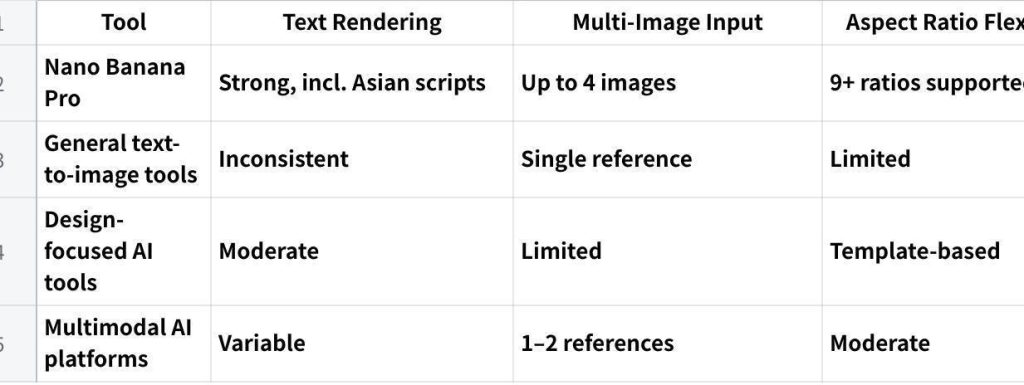
点击图片可查看完整电子表格
The combination of reliable multilingual text rendering, four-image reference input, and 4K output within a free, no-registration browser tool is what sets Nano Banana Pro apart. Each of these features exists in some form elsewhere — finding all three together, without friction, is considerably rarer.
Final Thoughts
For creators and teams where precision matters as much as creativity — where a generated image needs to carry accurate text, maintain brand consistency, and arrive in the right format for its destination channel — Nano Banana Pro directly addresses the workflow gaps that general-purpose tools leave open.
The most effective way to evaluate it is to bring your hardest prompt — the one involving text accuracy, multilingual labels, or cross-format brand consistency that has failed on other tools — and run it through Nano Banana Pro. Access is entirely browser-based through SuperMaker AI, with no account required to start. For anyone whose daily work involves producing structured, information-rich visuals at volume, it’s a meaningful and practical addition to any professional image production workflow.