
You already have the footage. You do not need a new recording, a better mic, or another hour of grinding—you need a faster way to turn the game stream you already recorded into shorts people actually watch. This guide walks through the exact workflow, step by step, using Video Editor AI to move from a long stream to publishable short-form clips.
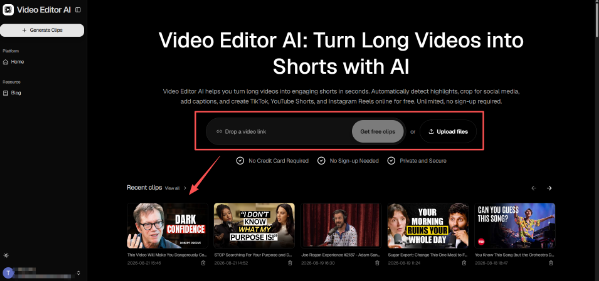
(Video Editor AI Main Page)
Before You Start: What You Need
You only need two things: the video file from your stream or match, and a rough idea of which moments are worth keeping. If you remember a big play, a funny moment, or a question someone asked, write it down. You do not need timestamps—just a short list to guide your review.
Keep your source files organized by game and date. A clear file name saves more time later than you expect, especially once you start building a library of recordings to repurpose.
The Step-by-Step Workflow
Step 1: Upload the source video
Open Video Editor AI and upload your recording. The tool is built to handle long footage, so you can upload a full stream without manually splitting it into pieces first. The goal is to let the AI scan the whole file and surface candidate moments you may have forgotten.
Once the video is uploaded, Video Editor AI analyzes the footage to identify promising segments. It looks for moments that stand out, trims dead air, and prepares candidate clips. You are not watching the whole stream again; you are reviewing a shortlist.
Step 2: Review the surfaced moments
This is where you add human judgment. Video Editor AI proposes candidates; you decide which ones are worth publishing. Ask yourself whether each moment works on its own, without the surrounding stream for context.
A good short clip should be self-contained. If a moment only makes sense because of what happened five minutes earlier, either cut it with more setup or skip it. Video Editor AI gives you the candidates quickly, but the “does this make sense alone” test is yours.
Step 3: Check captions and framing
Short-form video is often watched on mute, so captions matter. Video Editor AI generates caption drafts, but you should verify them. Game terms, player names, and fast commentary can trip up automatic transcription.
Framing matters too. A clip cut for a landscape stream may need reframing for vertical feeds. Video Editor AI supports that reframe, but check that the action—the character, the kill feed, the scoreboard—stays visible.
Step 4: Export and schedule the clips
Once the clips are ready, export them in the format each platform needs. Rather than publishing everything at once, spread the shorts across your calendar. One strong stream can feed a week of posts when the editing step is this fast.
(Video Editor AI Results Page)
Habits That Make Repurposing Easier
The more you treat repurposing as a routine, the less effort it takes. Note standout moments right after a session while they are fresh. Review each batch with the same short checklist: captions accurate, framing intact, and clip understandable alone. Video Editor AI removes most of the mechanical work; these habits remove the friction that remains.
What to Do When a Clip Underperforms
Not every short will land, and that is normal. When a clip underperforms, resist the urge to blame the game. Look at the hook, the length, and the caption. A moment that was exciting live may need a different opening to work as a short.
Video Editor AI makes it easy to recut the same source with a stronger hook or a tighter pace, so a weak clip becomes a second chance rather than a dead end. Over time, those small adjustments teach you which moments actually translate to short-form, and your repurposing gets faster with every session.
A Complete Example of One Session
To make the workflow concrete, imagine you recorded a two-hour session and you remember two things: a wild late-game play and a funny exchange with a teammate. You upload the footage to Video Editor AI, which surfaces several more candidates you had forgotten—a short teaching moment after a mistake and a clean opening sequence.
You keep four clips, verify the captions and vertical framing, and schedule them across the next four days. What started as one long recording ends the week as a small content run, without a single additional recording session. That is the entire point of the workflow: the footage was already there; Video Editor AI just made it usable.
Conclusion
Video Editor AI (https://video-editor.ai/) makes the move from game stream to shorts a straightforward process: upload, review surfaced moments, check captions and framing, and export. The workflow does not require editing experience, and it turns a recording you already made into multiple publishable clips. For gamers who want to grow on short-form platforms without spending hours in an editor, Video Editor AI is the step that turns the footage you already have into content you can actually ship.
Turn your game streams into shorts with Video Editor AI today: https://video-editor.ai/