

Through a combination of intelligent detection and handcrafted user controls, VisualGPT AI Object Remover works effectively with Image Editor to offer a refined experience for removing unwanted elements from photos. Its design supports practical editing demands across travel photography, e-commerce visuals, portrait refinement, and creative image preparation. With specialized modes for people, text, watermarks, wrinkles, and custom objects, the tool ensures that results remain natural, coherent, and visually accurate.
(AI Object Remover Featurepage in VisualGPT)
Intelligent Removal Modes Tailored to Real Photographic Needs
Removing People to Restore Clear and Balanced Scenes
Photographs taken in public environments often include unintended individuals, which can disrupt composition. The People removal mode analyzes surrounding depth, background structure, and lighting to rebuild the missing region after a subject is erased. Whether editing travel images, event photos, or casual snapshots, the tool provides clean results that maintain surface details, shadows, and natural color transitions. This kind of precision reflects how far image editing technologies have come in recreating scenes that look natural and uninterrupted.
Eliminating Text While Preserving Surface and Detail
Text can appear in the form of timestamps, labels, signage, or overlay graphics. VisualGPT AI Object Remover identifies the underlying structure behind the text and reconstructs it with precise texture matching. The removal is smooth, allowing images to be reused for design, personal archives, marketing projects, or content creation without distracting elements.

(The rendering of removing the text in VisualGPT)
Watermark Clearing for Reusable Visual Assets
Watermarks often appear across product images, stock photos, or reference materials. The Watermark mode reconstructs surfaces and gradients with accuracy, removing both opaque and semi-transparent markings. This allows users to refine images for presentations, research notes, and internal materials while preserving the original style and lighting.
Wrinkle Refinement for Portraits and Clothing
Wrinkle removal focuses on refining fabric creases or subtle skin folds in portraits. The system reduces visual noise while preserving depth and realism, avoiding overly softened textures. This balance makes the feature useful for professional portraits, wedding images, editorial photography, and promotional visuals where clarity is important.
Tools That Support Precision, Flexibility, and User-Guided Control
Custom Mode for Object-Specific Removal Requests
Custom mode allows users to define exactly what they want removed through a short prompt. This is ideal for objects not covered by predefined modes—such as stray reflections, utensils on a table, background clutter, or complex shapes. The AI interprets the description and removes the object with contextual reconstruction.
Brush Tool for Manual Marking and Fine Adjustment
For more hands-on editing, the Brush tool gives users the ability to manually outline the unwanted regions. Adjustable brush size helps refine small or detailed areas while keeping edge control. Once the region is highlighted, the AI reconstructs the area by analyzing the surrounding tones, shadows, and texture patterns.
Hybrid Editing for Difficult Scenes
Many images contain elements that require both manual and automated guidance. By combining Custom prompts with brush marking, users can achieve precise results even in photos with overlapping objects, irregular shapes, or textured backgrounds.
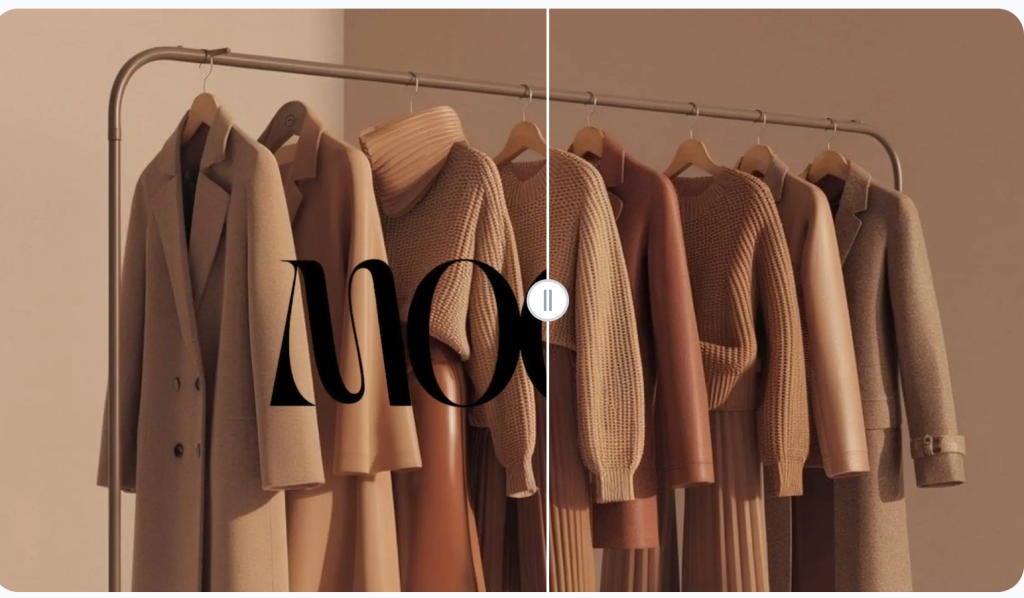
(Watermark removal function in VisualGPT)
Reconstruction Quality That Maintains Realism and Clarity
Texture Preservation Across Diverse Backgrounds
Whether the background is concrete, fabric, foliage, wood, or blurred bokeh, texture continuity is essential to maintaining natural appearance. The system rebuilds patterns and details based on material characteristics, preventing flat or inconsistent patches.
Accurate Matching of Light, Color, and Depth
Lighting direction, tonal gradation, and depth relationships determine the realism of any edited image. VisualGPT AI Object Remover evaluates these factors before reconstructing removed areas. This ensures that shadows, highlight behavior, and ambient tones remain cohesive across the entire photo.
Maintaining High Resolution for Professional Use Cases
Edited images retain their original resolution, making them suitable for e-commerce product listings, printed materials, design work, and portfolio presentations. This consistency is particularly important for professionals who rely on high-quality visual standards.
Practical Applications Across Travel, Commercial, and Creative Workflows
Refining Travel Photos by Removing Crowds or Intrusions
Travel imagery benefits significantly from clean compositions. The tool helps remove passersby, stray objects, or environmental distractions that diminish the impact of landscapes or city scenes. This makes photos more suitable for sharing, editorial use, or personal collections.
Enhancing Product Photography for Marketing and E-Commerce
Cluttered backgrounds or minor imperfections can weaken product presentation. By removing distracting props, surface reflections, or unwanted text, users can create polished visuals that support higher engagement and improved consistency across listings or promotional materials.
Preparing Social Media Visuals with Quick Corrections
Content creators and marketers often require fast edits that maintain quality. With its dedicated modes and efficient processing, the tool enables rapid cleanup of photos used for posts, thumbnails, advertisements, and stories. The results remain natural, visually appealing, and ready for immediate publication.
Efficient Editing Designed for Accessibility and Workflow Speed
Instant Browser-Based Editing Without Additional Software
VisualGPT AI Object Remover works entirely online, eliminating installation requirements and supporting cross-device access. Users can perform advanced editing tasks directly from their browser, regardless of technical skill level.
Clear Mode Structure for Predictable and Goal-Oriented Editing
The interface organizes removal options—People, Text, Watermark, Wrinkles, Custom, and Brush—into clearly defined modes. This helps users quickly select the appropriate tool and achieve consistent, reliable results.
Fast Rendering for High-Volume or Time-Sensitive Projects
The system processes edits efficiently, supporting users who handle multiple images or work under deadlines. This responsiveness makes it suitable for marketers, designers, photographers, and frequent content producers.
Conclusion:
VisualGPT AI Object Remover (https://visualgpt.io/ai-object-remover) provides an advanced yet approachable solution for eliminating unwanted elements while preserving the integrity of each photo. Its specialized modes, user-guided controls, and high-fidelity reconstruction techniques support a broad spectrum of editing tasks across travel photography, commercial design, social media, and everyday visual refinement. By delivering clean, natural, and consistent results without requiring technical expertise, it offers a dependable workflow for anyone seeking professional-quality image correction in an accessible online environment.