
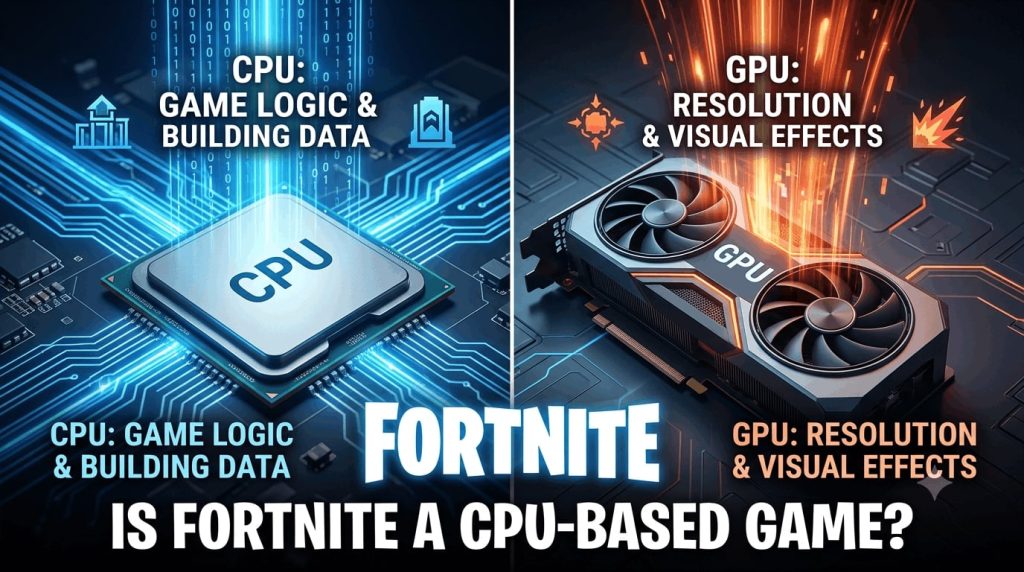
Have you ever wondered why your high-end graphics card still stutters during chaotic endgame build battles in Fortnite? You drop your visual settings down to competitive low, expecting silky-smooth 240 FPS. All that only to watch your frame rate drop sharply the second multiple players start building around you. If that frustrates you, you are not alone. Most competitive players face this exact wall, and the root cause usually comes down to how Fortnite treats your hardware.
In short, yes: for competitive players, Fortnite is primarily a CPU-based game. While high graphical presets push heavy workloads to your graphics card, hitting competitive frame rates requires a fast processor capable of feeding data to your system without delay. In this guide, we will break down exactly how Fortnite utilizes your system, run through 2026 performance benchmarks, and help you tune your rig for maximum stability.
Is Fortnite CPU or GPU Heavy?
To understand how your PC handles Fortnite, it helps to distinguish between what your central processor (CPU) and graphics processing unit (GPU) actually do while a match is underway.
The CPU’s Role: Game Logic, Building, and Frame Preparation
Every action in Fortnite requires instant mathematical calculation. Your CPU handles player positions, hit registration, physics, audio processing, and asset stream calls. More importantly, in Fortnite’s battle royale mode, every single piece of player-built structure generates immediate instruction data called draw calls. The CPU processes these draw calls before handing them over to your graphics card to be rendered.
The GPU’s Role: Pixel Rendering and Visual Effects
Your graphics card is responsible for translating the instruction frames prepared by the CPU into visual pixels. It processes textures, shadows, post-processing filters, lighting, and resolution scaling. If you turn on Unreal Engine 5 features like Nanite geometry or Lumen global illumination, your GPU takes on a massive workload.
Why Fortnite Frequently Causes CPU Bottlenecks
When competitive players lower their resolution to 1080p and switch to Performance Mode, they drastically reduce the visual workload on the GPU. The graphics card finishes its job in milliseconds and sits idle waiting for the CPU to send the next batch of instructions. If your processor cannot keep up, your GPU usage drops, leading to frame drops. If you want to see if your system has an imbalance between components, testing your rig with a bottleneck checker gives you an immediate picture of which part is holding back your frame rates.
Official Fortnite System Requirements on PC (2026)
Epic Games regularly updates Fortnite’s underlying engine, which raises the baseline requirements for smooth performance over time.
Minimum & Recommended Hardware Specifications
| Component | Minimum Specifications | Recommended Specifications |
| CPU | Intel Core i3-3225 / AMD Ryzen 3 1200 | Intel Core i5-7300U / AMD Ryzen 3 3300U |
| GPU | Intel HD 4000 / AMD Radeon Vega 8 | NVIDIA GeForce GTX 960 / AMD Radeon R9 280 |
| VRAM | Integrated | 2 GB VRAM |
| RAM | 8 GB RAM | 16 GB or higher |
| OS | Windows 10/11 64-bit | Windows 10/11 64-bit |
Epic Quality Presets & High-Refresh Competitive Specs
For players aiming for 144 Hz or 240 Hz displays on high settings, official requirements jump significantly:
- CPU: Intel Core i7-8700 / AMD Ryzen 7 3700X or newer
- GPU: NVIDIA GeForce RTX 3070 / AMD Radeon RX 6700 XT
- Memory: 16 GB+ high-speed RAM (DDR4 3600MHz or DDR5 6000MHz)
- Storage: NVMe Solid State Drive (SSD) with direct storage compatibility
For further details on updated requirements, check out the official Epic Games PC Specifications Guide.
Performance Benchmarks: How Settings Shift the Hardware Burden
Whether Fortnite acts as a CPU-heavy or GPU-heavy title depends entirely on your chosen rendering API and resolution settings.
+———————————————————————–+
| PERFORMANCE MODE (1080p Low) –> CPU-BOUND (Draw Calls & Logic) |
| DX12 EPIC SETTINGS (1440p/4K) –> GPU-BOUND (Nanite, Lumen & Pixels)|
+———————————————————————–+
Performance Mode (1080p Low): Maximum CPU Reliance
In Competitive Performance Mode, texture sizes, shadows, and lighting calculations drop to basic levels. This isolates the processor. Tests show that upgrading from a budget processor to a high-cache gaming CPU in Performance Mode can boost average frame rates by up to 60%, even while keeping the exact same graphics card.
DX12 & Epic Settings: Shifting the Load to the GPU
Switching to DirectX 12 with Epic graphical settings activates Unreal Engine 5 features. Reflections, ambient occlusion, and dense foliage push your graphics card usage up to 99%. In this scenario, the GPU becomes the primary bottleneck, and CPU usage relaxes.
The Impact of Resolution Scaling (1080p vs. 1440p vs. 4K)
Resolution dictates pixel count:
- 1080p (1920×1080): Low pixel count allows the GPU to process frames fast, making Fortnite heavily CPU-dependent.
- 1440p (2560×1440): A balanced workload where both components share equal burden.
- 4K (3840×2160): Shifting to 4K multiplies pixel calculation fourfold, turning the game into a GPU-bound workload regardless of your CPU.
Best Processors for Fortnite for Maximum FPS
Selecting the right processor depends on your target refresh rate and display resolution.
Top High-End Pick: AMD Ryzen 7 7800X3D (3D V-Cache Dominance)
The AMD Ryzen 7 7800X3D remains one of the fastest gaming CPUs available. Its massive 3D V-Cache allows the processor to store game instructions directly on the chip, reducing latency during complex build battles and maintaining high 1% low frame rates.
Top Modern Mid-Range Pick: Intel Core Ultra 5 245K
Intel’s Core Ultra 5 245K offers excellent single-core speed alongside strong multi-threaded capability. It easily handles high frame rate gaming in Performance Mode while managing background applications like Discord or streaming tools without frame drops.
Best Budget Picks: AMD Ryzen 5 7500F & Intel Core i5-12400F
If you are building a budget rig, the Ryzen 5 7500F (on the AM5 platform) or Intel’s i5-12400F offer exceptional value. Both provide solid 1080p competitive performance above 144 Hz without demanding expensive cooling solutions.
How to Fix High CPU Usage and FPS Drops in Fortnite
If your game suffers from stuttering or micro-freezes, several configuration tweaks can help stabilize performance.
Optimize In-Game Settings (DX11 vs. DX12 Rendering API)
While DirectX 11 was long considered the standard, DirectX 12 optimizes multi-core CPU distribution much better on modern processors. If your CPU has 6 or more physical cores, testing DX12 often reduces frame drops compared to DX11.
Enable Memory XMP / EXPO Profiles for Low RAM Latency
Fortnite relies heavily on fast system memory. If you haven’t enabled XMP (for Intel) or EXPO (for AMD) in your BIOS, your RAM is likely running at baseline stock speeds. Enabling these profiles unlocks advertised speeds, directly improving 1% low frame times.
Cap Your Frame Rate to Match Display Capabilities
Uncapped frame rates force your CPU to push frames continuously, creating thermal buildup and erratic frame timing. Cap your FPS slightly below your monitor’s refresh rate (for example, 141 FPS on a 144 Hz monitor, or 237 FPS on a 240 Hz monitor) to smooth out frame delivery.
Clear Background Process Bloat in Windows
Background applications like web browsers, RGB controllers, and overlay software steal core cycles from your primary game thread. Closing extra processes before launching the game keeps CPU execution paths clear. Running a quick check on an online CPU bottleneck calculator will confirm whether your background system tuning successfully removed hardware limits.
Frequently Asked Questions (FAQs)
Why does Fortnite stutter even on high-end PCs?
Stuttering on high-end rigs is often caused by shader compilation stutter when loading new seasonal assets, unoptimized RAM speeds (disabled XMP/EXPO), or thermal throttling on a single CPU core.
Does Unreal Engine 5 make Fortnite more GPU-intensive?
Yes. With the introduction of Unreal Engine 5, features like Nanite geometry and Lumen lighting shift significant rendering tasks back to the GPU. However, if you disable these features in Performance Mode, the game returns to being heavily CPU-bound.
What component matters most for achieving 240+ FPS?
To sustain a stable 240+ FPS in competitive situations, your processor is the single most critical component. Pair a high-single-core speed CPU (such as a 3D V-Cache processor) with fast, low-latency RAM for optimal stability.
Final Verdict
When asking is fortnite a cpu based game, the answer ultimately depends on how you play. If your goal is visual fidelity at high resolutions like 4K with ray tracing, your graphics card does the heavy lifting. But for the vast majority of players who favor smooth frame rates, low input lag, and competitive 1080p settings, Fortnite relies far more on your CPU than almost any other component in your rig. Balancing your processor and memory setup will keep your frame rate rock solid when the action peaks.